Your agency answers the phone.
ATLAS runs what happens next.
The quote that never went out. The job nobody confirmed. The customer who asked a question on Tuesday and is still waiting. Once ten people are involved, nobody is watching the gaps between your tools — and the gaps are where the money leaks.
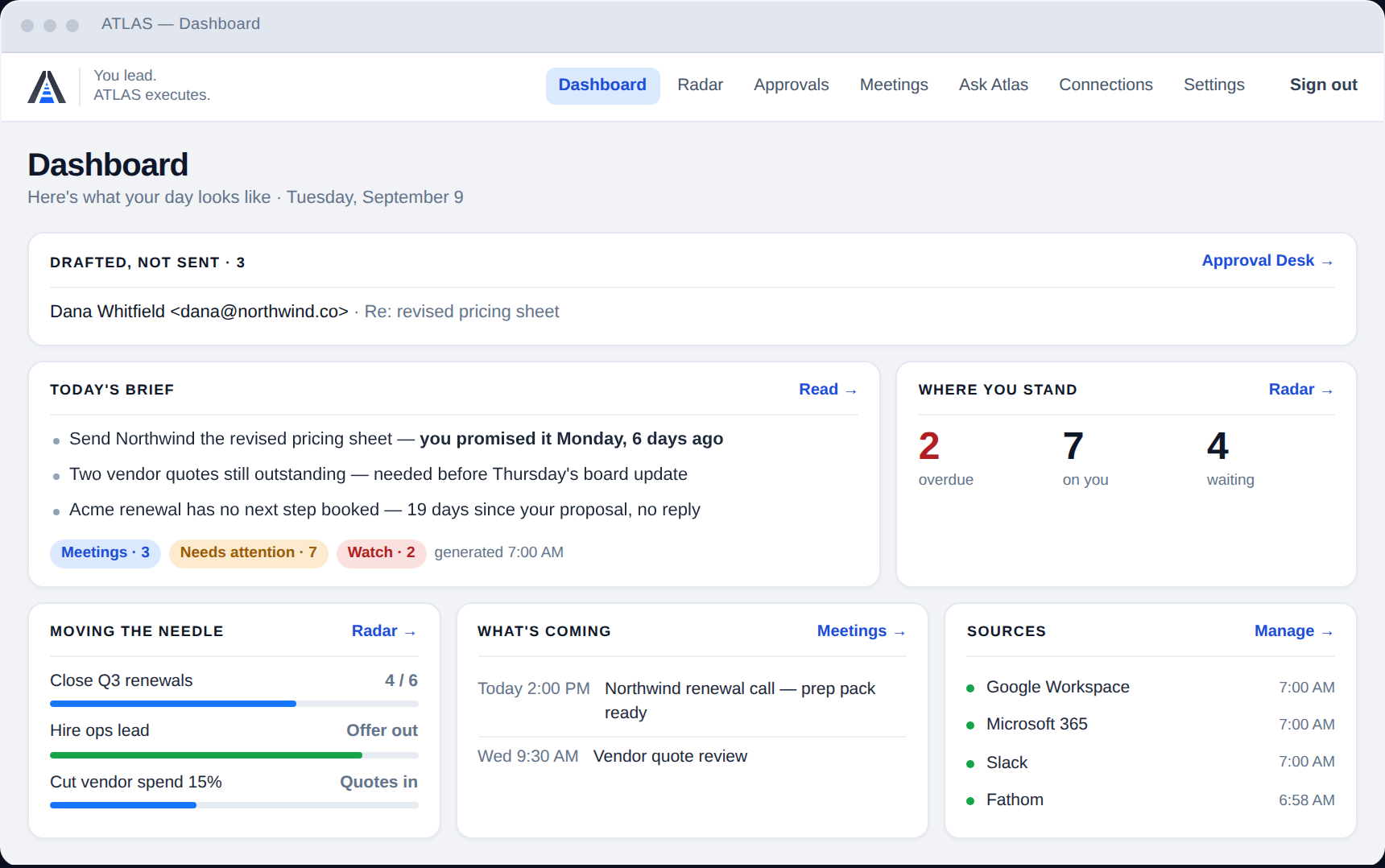
One screen, every morning, for every person on the team.
Two halves of one job
Most businesses at this size already have someone handling the phone and the pipeline — usually their marketing agency, running it through GoHighLevel. ATLAS does not replace that, and does not want to.
The front of the business
- Calls answered and routed
- Missed-call text-back
- Lead capture and the pipeline
- Review requests and campaigns
- The phone number itself
The work behind it
- What each person owes, every morning
- Commitments made and never closed
- Replies drafted, ready to approve
- Meetings prepped and recapped
- One place to ask what was said
34% person-answered rate: Invoca 2026 home-services benchmarks, 70M+ tracked calls.
Six things, working today
Daily brief
Every morning, each person gets what is actually on them — overdue first, with the reason attached.
Follow-up radar
Commitments made across email, chat and meetings that nobody closed. The quiet ones surface before they cost you.
Approval desk
Replies and follow-ups drafted and queued. A person approves; nothing sends on its own.
Meeting prep & recap
The pack before, the summary and actions after, filed where the next person can find them.
Workspace search
“What did we quote the Hendersons?” answered from your own systems, with the source.
Across the whole team
Not one inbox. Shared briefs, delegated items with owners, and a view of what is moving and what is stuck.
What it plugs into
Working today, in production:
In build, and the next one to land:
Not connected yet, and we will say so rather than let you find out on the install call:
ATLAS Notetaker — included with Operations
Included in every Operations band at no extra charge — on Solo and Team it is a $15/user add-on. It joins the meeting, transcribes it, and the recap and action items land straight in the daily brief rather than in a second tool nobody opens.
Fair use: 10 meeting-hours per desk per month, pooled across your team. A 10-desk account gets 100 hours a month to share, which is more than most businesses record. Beyond the pool it is $1.25/hour, billed monthly and shown on the invoice before it is charged — we will tell you when you are close rather than after.
If you already use Fathom or Fireflies, keep them and pay nothing. ATLAS reads their transcripts directly, and a BYO notetaker never counts against your connector limit. It is there for the businesses that have neither — not to replace one that already works, and using yours costs you nothing either way.
Two ways to check
Modelled, not measured. A fully loaded hire is salary plus about 25% for payroll tax, benefits and equipment. The hours figure is deliberately set low — published research puts information-hunting and admin far higher, and we would rather the number on this page be one you can argue with.
Priced by desks, installed for you
A desk is a person who works at a screen most of the day. Field crews who only receive jobs do not need a seat.
| Band | Desks | Per month | One-time install |
|---|---|---|---|
| Operations 10 | up to 10 | $1,495 | $4,500 |
| Operations 30 | up to 30 | $2,500 | $6,500 |
| Operations 50 | up to 50 | $3,950 | $9,500 |
What the $4,500 actually buys
It is a person doing work, which is why it is priced and not free. Roughly three weeks from paid to live.
- Day 0–3DiscoveryNinety minutes on how the work actually moves through your business — who owns what, where it stalls, what “done” means. Your agency leads it; we attend.
- Day 3–7Connections and consentYour email, calendar, chat and tasks connected one at a time, with read-only access by default. Recording and monitoring notices configured for your state, and the templates handed to you.
- Day 7–14ConfigurationYour people, your ownership rules, your definition of overdue. ATLAS runs at draft-only for the whole of this period — it watches and suggests, and sends nothing.
- Day 14–21TrainingA working session with your team, not a slide deck. Your agency hosts it, we deliver it, and everyone leaves having approved something real.
- Day 30First reviewWhat got caught, what was a false alarm, who is actually using it. Approval levels raised only where you are comfortable.
- Day 60 and 90Reviews two and threeThe same numbers again, so the trend is visible. With your permission these become the case study — and until we have enough of them, this page will say so.
We do not have customer results yet
ATLAS is early. Every number on this page is modelled from published research and labelled where it is. Rather than borrow someone else's testimonial, here is the slot they will go in and how they get filled.
Hours recovered against each account’s own week-one baseline. Items caught that would have been missed — and every false alarm alongside them. Share of drafted actions approved unedited. Published with the misses, or not published at all.
The ones worth asking
Six questions, then a 30-minute call
Answering these first means the call is about your business rather than about data collection. Nothing is charged and no card is taken.